Using Guidelines
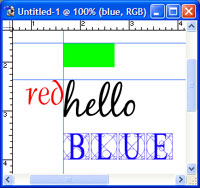
Guidelines are temporary blue lines that don't show up in your final work but are useful for many things while creating including:
- *lining up text/pictures*
- centering, spacing, dividing
- setting boundaries for scissor cutting
- measuring distances
Guidelines are made by dragging from the rulers on the edges of your document (ctrl + R to enable rulers).
Ctrl + ; will hide and unhide guidelines.
To have object snap to the guidelines, goto the View menu and click on Snap To.
Go back